ShopDreamUp AI ArtDreamUp
Deviation Actions


Suggested Deviants


Suggested Collections


Description
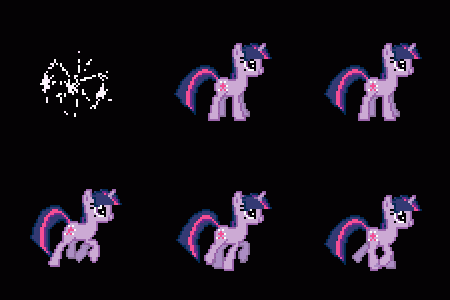
I put up a journal asking what pony you guys wanted to see made into a boot logo next, and Twilight got the most votes! Here y'all are.  Click "Download File" over on the right there to get it. Installation instructions are in the readme, as usual.
These take a long time to make! I had forgotten how long they took... I don't think I'll be doing any more for a while, but we'll see. Sorry to the other people that gave their input!
Here's a side note for the Boot Uploader program. I got the text on the bottom to be blank by using the blank character alt-code (Alt+255). If you leave one of the text boxes blank, the animation does not show up for some reason. So if you want one of the text fields to be empty, make sure you use Alt+255 on the numpad to make a blank character!
Click "Download File" over on the right there to get it. Installation instructions are in the readme, as usual.These take a long time to make! I had forgotten how long they took... I don't think I'll be doing any more for a while, but we'll see. Sorry to the other people that gave their input!
Here's a side note for the Boot Uploader program. I got the text on the bottom to be blank by using the blank character alt-code (Alt+255). If you leave one of the text boxes blank, the animation does not show up for some reason. So if you want one of the text fields to be empty, make sure you use Alt+255 on the numpad to make a blank character!
Comments30
Join the community to add your comment. Already a deviant? Log In

good one boy, i like it